Co-op, DLC and versions
Co-op and crossplay
Play together in Oxbow. Crossplay was announced for supported PC versions, PlayStation 5 and Xbox Series X|S.
Host or join a session
The host starts or loads an Oxbow game. Guests use the connection method shown in game. The published PC game information lists up to four players in co-op.
Invite friends or show the session code
Open the pause menu. In the Steam tutorials, the controls appear at the bottom of the screen. Check which controls your session offers.
| Input | Invite Friends | Show Code |
|---|---|---|
| PC | C | H |
| PlayStation | Triangle | R3 |
| Xbox | Y | Press right stick |



Show or hide the HUD
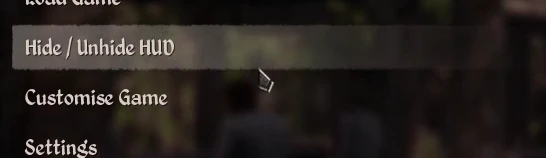
In the three tutorials shipped with Steam, select Hide / Unhide HUD in the pause menu, just above Customise Game. The compass and meters disappear after the first selection and return after the next. These tutorials were recorded on an earlier version.
Announced platforms
The crossplay announcement lists Steam, Epic Games, GOG, Microsoft Game Pass, PlayStation 5 and Xbox Series X|S. Check the installed build, especially when one player uses a test branch.
If joining fails
Compare versions and map selection. Ask the host to confirm the session is open for co-op and check the messages displayed on each platform.
Check a player’s settings
The distributed Steam build applies changes to each player’s state on the server across the 10 checks in the reference. The controls available to guests in the UI are still to be verified.
| When to check | Reference |
|---|---|
| Weight, survival or fast actions differ between PC players | Game settings and co-op player options |
Related references
See the HUD control in the pause menu
Sources
Sources and version information at the end of this page
- Official Medieval Dynasty page on Steam
- Render Cube and Toplitz cross-play announcement
- Oxbow and co-op FAQ
- Compiled player settings and replication fields · Steam build 26431490
- HUD tutorials shipped with Steam for keyboard, PlayStation and Xbox