Quests and progression
Pay Taxes
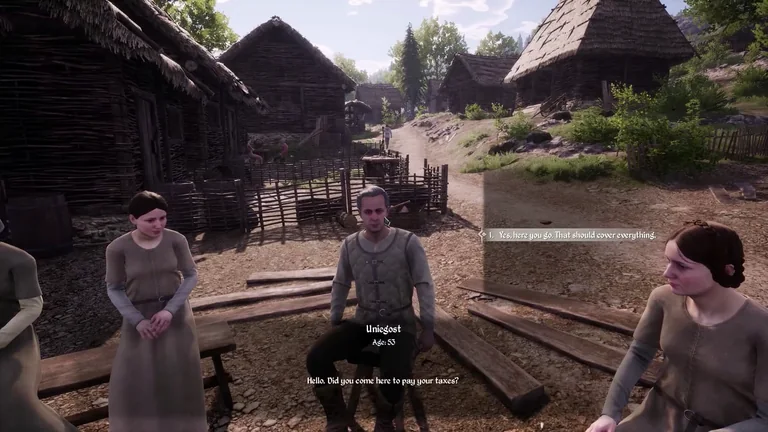
In the Valley, follow Pay Taxes to check the amount and recipient. The tutorial shows the payment dialogue with Uniegost in Gostovia.
Prepare for taxes
The tutorial shows a bill of 4.4 coins in the Valley. Use the amount displayed in your current quest.
| Step | What to do |
|---|---|
| Check taxes and debt in Management | The tutorial shows “Taxes (Debt)” as 459.7 (0). The first number is taxes and the number in parentheses is debt. |
| Check the quest objective | Follow “Pay Taxes” to see who to pay and how much to bring. |
| Find the recipient shown in the tutorial | Uniegost in Gostovia |
| Confirm the payment | Choose the payment response in dialogue. The quest tracker clears after the conversation in the tutorial. |
Quest giver and location
| Attribute | Value |
|---|---|
| Quest | Pay Taxes |
| Type | Chapters |
| Map | The Valley |
| Associated character | Le Castellan |
| Seasonal deadline check | Enabled in the table. Read any deadline in your in-game journal before changing season. |
| Game ID | Taxes |
Objectives
These directions describe the reviewed game data. Check your journal for the active stage and targets.
| Stage | Objective | Target | What to prepare |
|---|---|---|---|
| 1 | Talk | — | — |
Recognise the payment dialogue
Sources
PC 2.7.0.5 game tables and localisation
- Quest, objective and character tables · Steam PC 2.7.0.5
- Game.locres and table labels · Steam PC 2.7.0.5
- Valley tax payment and Management tutorials distributed with Steam PC 2.7.0.5 · English interface